Digital commerce/online shopping. When you are making an account for a website that lets you shop online, it usually asks you for some information like your email, password, and sometimes your phone number. However, it is stored on the companies server and when hackers hack the servers, they steal millions of accounts and sell it on the dark web. From then, the buyers can go to a bank, show the bankers your information, and take out as much money as they want. Since hackers have all your information, they can watch you and if you have a child, when they go on a field trip; the hackers can tell you that they have kidnapped your child and will ransom you.
Hackers aren’t the only problem your bank account has to worry about. Stores can show you pictures and ads that might make people want to buy it. However, when the customers buy it, it isn’t what they expected at all! Consider this: Jose sees a ps5 for $20. He knows that it is way too cheap. What should he do? Jose should definetly report it to higher authority because it is a guaranteed scam!
When people hear the word cyberbullying they usually think of people taking advantage of others. However there is a grey area that most people don’t know about.
Cyberbullying is when people use digital technology to impersonate you, shame you, exclude you, humiliate you, threaten you, demand something from you, embarrass you, intimidate you, defame you, stalk you, abuse you, flame you, trick you, and harass you. However the signs of it aren’t very obvious at first until they have something they can use to blackmail you or hold against you.
The risks of cyberbullying is hard to counter; for example, cyberbullies can strike at anytime and since they are , it can impose fear. A Yale study shows that victims of cyberbullying have a higher percent of suicidal thoughts, higher rates of depression and anxiety, difficulty sleeping, and many more symptoms.
With the knowledge from before, maybe the next time you go online you can spot cyberbullying and stop it. You could also protect yourself online by asking these questions to yourself: Is this how I want people to see me?… Could someone use this to hurt me?… Would I be upset if I shared it with others?… What is the worst thing that could happen if I shared this?. I for one, shared a few personal things online like my name or where I live. However, since I know better, next time I go online I will make sure to not share anything about myself and if I have to I will be very vague about it.
Technology has been used since the beginning of time, however as technology can solve our problems it will create greater problems such as the car. Cars are one of the most noticeable invention that solved and created problems. For example, gasoline cars solved the problem of of getting to places faster, but it consequently aided the problem of pollution. However unlike cars modern tech has a subtle dark side that most people don’t notice until it’s too late.
Modern technology has the most diverse uses, so it can be an excellent tool for learning such as making an AI tutor to help you with a subject you have trouble in. Modern technology can be used by teachers as well for dull tasks such as grading, creating tests, and meetings. I can also be used by students to learn and/or get useful sources that would be hard to find on your own.
Technology means different things where ever you go for example IBsT. In IBsT, technology is a way to learn and grow while teachers teach not only their subjects and life advice, but they also teach how to utilize technology to your advantage without getting it to do things for you. They also teach keyboarding to build finger muscles, to be able to type at a fast rate, and to familiarize the students with keyboarding before people stop using paper and only use keyboarding.
Modern technology’s dark side can completely destroy your device or even your life! Harmful computer viruses can destroy your computer or pressure to succeed can make a child use AI to give answers on an assignment. Modern technology (specifically the internet and social media) can give children low self-esteem, depretion, and it can shower them in non-child friendly content.
While modern technology has it’s pro’s, it also has some cons.
I went to the computer lab in my school to dissect and extract the organs/parts of the computer for the first time and learn where they go and fit in place. The computer was much simpler than I thought it would be. It was so IDIOT proof (I don’t know why they make it so easy) that it wasn’t very challenging to remember where all the wires go. For almost all of the wires I didn’t have to remember them or where they went because they all had different shapes and sizes. For example, the part of the wires that you plug into was a square and another was two triangles and a hectogon!
The big, main components (there are 6 of them by the way) are so big compared to the rest (even the CPU) that it was pretty easy to take them out of the case and put them back in. The only part that I had trouble with was taking the ram and the solid-state drive out of the case. Some of the parts need a little force to take out, (like the ram and solid-state drive) but don’t pull to hard or else you will break it. Some parts are so sensitive that if you even touch it, you will break it or if you set it down on the table it’ll also break.
I also learned that PCs are more reliable than desktops because if a part breaks you can always replace it but with a desktop if a part breaks you have to buy a new desktop. But the reason that desktops cost more is because they are portable, and you can take them wherever you want. The pictures are me taking apart an extremely old computer, it even has a DVD player on it too! When you’re taking apart your own computer don’t expect it to look it like this because this is basically 10 years old. But take extreme caution especially when handling with the PSU. Don’t take that apart to see what’s inside because it holds a charge for many years and opening it might KILL you.
Ever since I learned what a computer even was, I thought it was the most complicated thing in the world (sorry for the nostalgia)! But now I realize that behind all of those fascinating lights and pixels is really just a simple (not really that simple to make) piece of machinery. So, my conclusion about my computer is that computers are hard to make( cuz it took us 300,000 years to make.) but it works relatively simple and similar to how a human body works (because humans made it). Computers are also very delicate and dropping it will result in SUDDIN DEATH!
Learning python (or any kind of coding) is probably going to be one of the best choices you could make in your life. It is very important and will help you if you have challenges on using a computer. Here is an example of a basic script.
print(“helloworld.”) print(“\n”) print(“I am learning python.”)
And if you run it it will look like this.
Pretty cool right? Well this is only the most basic scrip. Here is another example.
If you type this and you run it you will get this.
For some scrips you need to write something. Like in this one. where you have to write your first and last name.
Now let me teach you some python. If you download python3.12.0 and type it in windows, then it will be called IDLE shell 3.12 and if you click on it then you will be sent to the IDLE shell. The IDLE shell is where everything that you run goes. However, the place where you write the code is in a different file. To get that file you need to the IDLE shell and click on file than click new file. That new file is where you write the code.
Landscape: A screen display that is higher than it is longer.
Orientation: Positioning items that are related.
Portrait: A type of orientation.
Save-as vs save: Save means to open a old thing but save-as means to open a new thing.
If you click the title bar 2 times really fast the computer shortens your page.
If you press alt+f4 the computer deletes all of you pages.
if you press alt+tab the computer will switch the page your on if you have more than one page(when you do this the computer will show you clearly what page your on).
If you press the windows key the computer displays the start menu with a search box in the bottom left of your screen.
If you press wk(wk is the windows key)+m the computer minimizes all of your pages
If you press wk+spacebar and you have two languages on your computer it will change the language your on to the other language you have.
WK+t changes witch page your on the bottom of your screen.
WK+tab minimizes the page your on.
If you click on the scroll on a mouse than wherever your mouse is than the computer screen will follow it.
If you click and hold on the top of a page and shake your mouse wile your holding a page then the computer will minimize all the other pages you have open and if you keep on shaking your mouse than the computer will maximize pages you minimized.
If you press control+shift+escape the computer will show how much memory you have on your computer.
If you press ctrl+c than (ctrl is short for control) the computer copies whatever you highlighted blue.
If you press ctrl+x than the computer will cut selected files from a document or folder.
If you press ctrl+v than the computer will paste whatever you copied.
If you press ctrl+z than your computer will undo an action that you’ve done.
If you press ctrl+p than the computer will print whatever your screen is showing.
If you press ctrl+k than the computer will install a hyperlink.
ctrl e is different wherever your on for example if you press it on internet browsers than it focuses on the search bar.
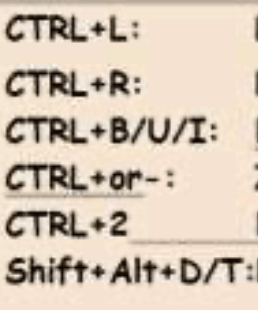
If you press ctrl+l than the computer aligns a paragraph on the left for Microsoft word.
If you press ctrl+r than the computer will reload your page.
Ctrl+b changes a highlighted word bold or unbold.
If you press ctrl+u then the computer will underline and highlighted text.
Ctrl+i toggles italic on highlighted text.
Ctrl+2 makes you go to your second tab.
If you press shift+alt+d on Microsoft word, then the computer inserts the data file code.
If you press shift+alt+t on Microsoft word, then the computer inserts the time field code.